Data structure animation: stack, queue, hash map and tree as machines (SVG + TypeScript)
A data structure is state that changes one operation at a time. Animate that state, give every item a stable id and draw each structure as a machine people already understand.
By Homingo Learn ·
Most data structure animations are boxes sliding around a whiteboard. They show that something moved, but not why, and they get hard to follow the moment two things change at once. This guide builds animations that teach: each structure becomes a physical machine, the animation is driven by a log of operations, and only the parts that actually change are allowed to move. The code is plain TypeScript writing SVG, so the same figure works on a course page, in a lecture slide and in a 1080x1920 explainer reel.
Animate the state, not the drawing
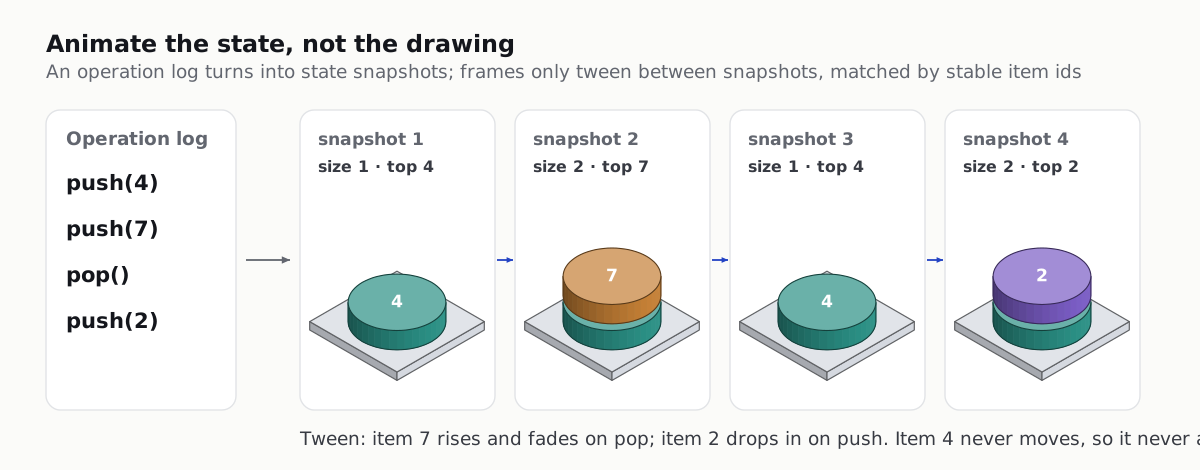
Separate three things that tutorials usually mix up:
- Operations: the list of what happens (
push(4),pop()). This is your script. - Snapshots: the full state after each operation, every item with a stable id.
- Frames: drawings in between two snapshots. An item that exists in both moves; an item only in the new one enters; an item only in the old one leaves.
With that split, the drawing code never needs to know what a stack is, and the data structure code never needs to know about pixels. You can also test the snapshots like any other function.
type Item = { id: string; value: number };
type Op = { kind: 'push'; value: number } | { kind: 'pop' };

export function stackSnapshots(ops: Op[]): Item[][] {
  let next = 0;
  let stack: Item[] = [];
  const out: Item[][] = [[]];
  for (const op of ops) {
    if (op.kind === 'push') stack = [...stack, { id: `i${next++}`, value: op.value }];
    else stack = stack.slice(0, -1);
    out.push(stack);
  }
  return out;
}

// stackSnapshots([{ kind: 'push', value: 4 }, { kind: 'push', value: 7 }, { kind: 'pop' }, { kind: 'push', value: 2 }])
// -> [], [4], [4, 7], [4], [4, 2]   (as items with ids i0, i1, i2)
snapshots.ts: run an operation log on a stack and keep every state. Ids come from a counter, so equal values stay different items.
Never key items by their value. Push 4 twice and a value-keyed animation shows one plate jumping instead of a second plate landing. A counter-based id is the cheapest fix.
The same idea scales up to whole systems in isometric architecture diagrams as code.
Stack: a pile of plates
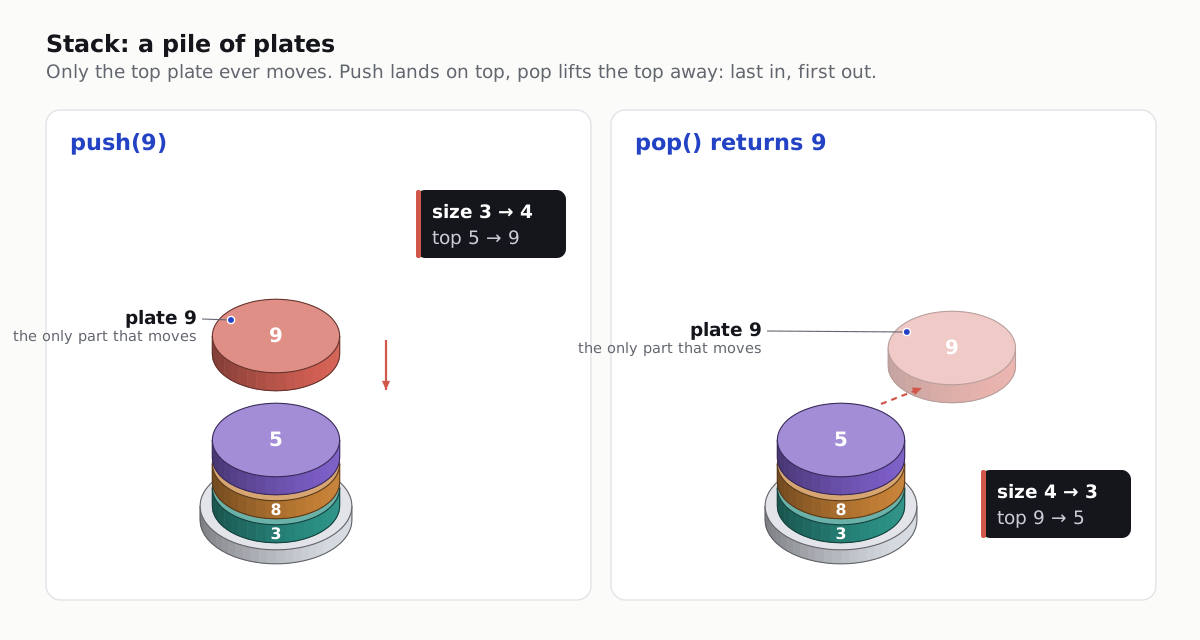
A pile of plates in a canteen is the oldest analogy in computer science, and it works because people know the rule without being told: you take the top one. Make the animation obey the same rule. On push the new plate drops from above and lands on top; on pop the top plate lifts away. Nothing else moves, so the eye goes straight to the one part that matters.
- Readout beside the stack:
sizeandtopchange on the same frame the plate lands, not before. - Call stack version: label each plate with a function name and its arguments. Recursion becomes a pile that grows and then unwinds plate by plate, which is far clearer than an indented trace.
- Overflow: draw a maximum-height mark beside the pile. When the next plate does not fit, show it, then stop. A stack overflow is a physical event here.
Queue: a conveyor with two ends, or a ring
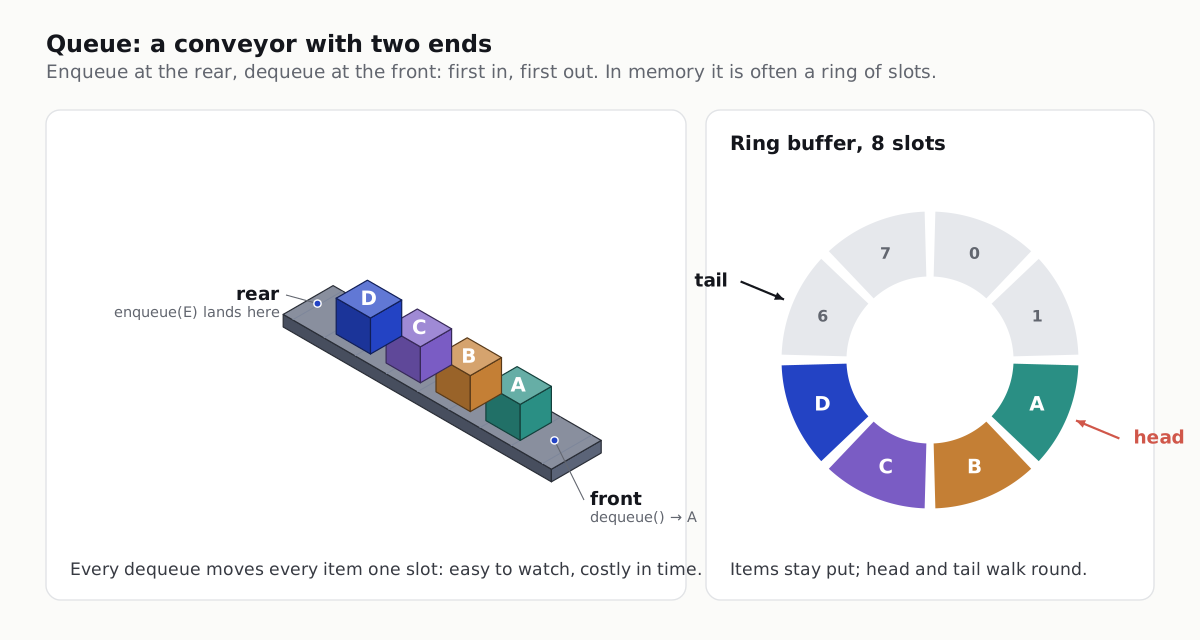
A queue has two ends, so its machine needs two: things go on at the rear and come off at the front. A conveyor belt makes first in, first out obvious. It also shows the cost of the naive array version: every dequeue shifts every item along by one.
Then show what fast queues actually do. A ring buffer keeps the items still and moves two pointers instead: head marks the next item to leave, tail the next empty slot. Both walk round the ring and wrap with % capacity. Animate the pointers, not the items, and the point of the data structure is visible in one shot.
export class Ring<T> {
  private slots: (T | undefined)[];
  head = 0; // next item to dequeue
  tail = 0; // next empty slot
  size = 0;

  constructor(readonly capacity: number) {
    this.slots = new Array(capacity);
  }

  enqueue(v: T): boolean {
    if (this.size === this.capacity) return false; // full: show it, do not overwrite
    this.slots[this.tail] = v;
    this.tail = (this.tail + 1) % this.capacity;
    this.size++;
    return true;
  }

  dequeue(): T | undefined {
    if (this.size === 0) return undefined;
    const v = this.slots[this.head];
    this.slots[this.head] = undefined;
    this.head = (this.head + 1) % this.capacity;
    this.size--;
    return v;
  }

  snapshot() {
    return { head: this.head, tail: this.tail, slots: [...this.slots] };
  }
}
ring.ts: a fixed-size ring buffer queue. The animation reads head, tail and slots from each snapshot.
Hash map: a cabinet of drawers
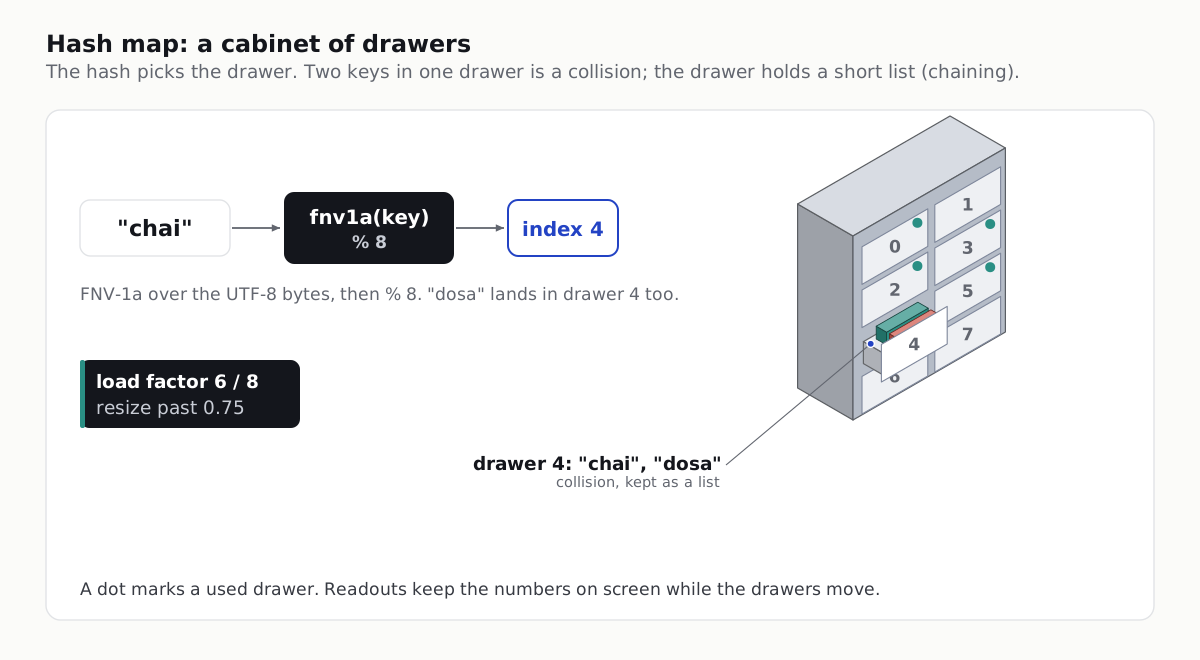
A hash map is a cabinet with numbered drawers. The hash function turns a key into a drawer number, so finding a key means opening one drawer instead of searching the whole cabinet. When two keys land in the same drawer, that drawer holds a short list: that is separate chaining, and it is why a lookup is fast on average but not always.
For the figure you need a hash that is easy to show and still spreads keys well. FNV-1a is short enough to put on screen:
export function fnv1a(key: string): number {
  let h = 0x811c9dc5;
  for (const byte of new TextEncoder().encode(key)) {
    h ^= byte;
    h = Math.imul(h, 0x01000193) >>> 0;
  }
  return h;
}

export const drawerOf = (key: string, drawers: number) => fnv1a(key) % drawers;

// Animation beats for set(key): key card appears -> hash box glows -> index shows
// -> drawer slides out -> card drops in -> drawer closes -> load factor ticks up.
hash.ts: FNV-1a (32-bit) over the UTF-8 bytes of the key, then the drawer index. Good for teaching figures; real hash maps use their language runtime's own hash.
- Show the load factor: items divided by drawers, on screen at all times. When it passes the threshold your map uses (0.75 is a common default), animate the resize: a bigger cabinet appears and every card is re-filed, because its drawer number changes with the drawer count.
- Show a collision on purpose: pick two keys that really land in the same drawer with your hash and drawer count (with FNV-1a and 8 drawers, “chai” and “dosa” both land in drawer 4). Compute them first; never fake the index in the drawing.
Machines like this cabinet are what our Isometric explainers skill has Claude Code draw: crafted isometric figures with live readouts, for docs and for 1080x1920 explainer reels.
Binary search tree: a sorting machine of gates

Think of every node as a gate with one question: is the new value smaller or larger than me? The value rolls down from the root, turning left or right at each gate, until it reaches an empty spot. For teaching, the path matters more than the final tree, so make the insert function return the path:
type Node = { id: string; value: number; left?: Node; right?: Node };
type Step = { at: string; cmp: 'left' | 'right' };

export function insert(root: Node | undefined, node: Node): { root: Node; path: Step[] } {
  if (!root) return { root: node, path: [] };
  const path: Step[] = [];
  let cur = root;
  for (;;) {
    const dir = node.value < cur.value ? 'left' : 'right';
    path.push({ at: cur.id, cmp: dir });
    const child = cur[dir];
    if (!child) {
      cur[dir] = node;
      return { root, path };
    }
    cur = child;
  }
}
// Each step is one beat: highlight the node, show "65 > 50 -> right", move the token along the edge.
bst.ts: insert that records the path for the animation, one comparison per step.
This insert changes the tree in place. If you keep snapshots, clone first (structuredClone(root)) so every stored snapshot stays a separate tree, exactly like the stack snapshots above.
Add a readout for comparisons and tree height. Then insert sorted values (10, 20, 30, 40...) and let the tree lean into a straight line. Viewers see why balanced trees exist without a single formula.
Tween between snapshots, not inside them
Once every item has an id, one small function animates any structure: match items by id, ease the ones that moved, fade or drop in the new ones, lift or fade out the removed ones.
type Pos = { x: number; y: number; opacity: number };
type Layout = Map<string, { x: number; y: number }>;

const ease = (t: number) => (t < 0.5 ? 4 * t * t * t : 1 - (-2 * t + 2) ** 3 / 2); // ease-in-out cubic

export function frameAt(from: Layout, to: Layout, t: number): Map<string, Pos> {
  const k = ease(Math.min(1, Math.max(0, t)));
  const out = new Map<string, Pos>();
  for (const [id, b] of to) {
    const a = from.get(id);
    if (a) out.set(id, { x: a.x + (b.x - a.x) * k, y: a.y + (b.y - a.y) * k, opacity: 1 }); // moved
    else out.set(id, { x: b.x, y: b.y - 60 * (1 - k), opacity: k });                     // entered: drops in
  }
  for (const [id, a] of from) {
    if (!to.has(id)) out.set(id, { x: a.x, y: a.y - 60 * k, opacity: 1 - k });           // left: lifts away
  }
  return out;
}
tween.ts: positions for one frame between two snapshots. Layout functions turn a snapshot into { id -> x, y } for each structure.
- One operation per beat. Give each operation its own beat, roughly half a second to a second, and hold briefly after it so the readout can be read.
- Stagger, do not stack. When a resize re-files every card, start each card a few frames after the last. Ten cards moving together read as one blur.
- Respect reduced motion. On a web page, check
prefers-reduced-motionand jump straight to each snapshot instead of tweening.
Turn it into a 1080x1920 explainer reel
The same snapshots drive a vertical video. Render each frame in a browser at 1080x1920 (with a React video tool like Remotion, or a headless browser plus ffmpeg), keep the structure and its readout in the middle of the frame, and narrate one operation per beat. Plan the shots before you build: open on a question (“why is a hash map lookup fast?”), show the whole machine, run three or four operations, then end on the case that breaks it (a collision chain, a lopsided tree). Camera moves, cutaways and narration cues are covered in our exploded view explainer reel guide, and isometric projection and shading in isometric SVG diagrams for docs.
For the storyboard behind a one-concept explainer, in Hinglish: educational animation video kaise banaye.
Checklist before you publish
- Correct first: every snapshot comes from running the real code, and you have unit tests for the operations.
- Stable ids: equal values are separate items; nothing teleports.
- Only what changes moves: if an item did not change, it does not animate.
- Readouts on screen: size, top, head and tail, load factor or height, updated on the same frame as the change.
- Honest analogy: say once where the machine stops matching memory (the conveyor shifts; the ring does not).
- Readable on a phone: labels stay large at 1080 px width, and nothing important sits under the app’s buttons.